Summary
A Memo is used to deliver email or SMS messages where recipient address/phone number and content are derived from a Data Source. Supported Data Sources include Database Query, Excel File List, and MultiColumn List.
Memo for SMS requires Twilio SMS.
Requirements
Data Source must contain a column named EMAIL.
SMS
Data Source must contain a column named PHONE.
Create a Memo
- Select Manage
- Select New > Memo
- Enter a Name
- Select Save
- Select a Data Source
Customizations
Extra Columns
The Data Source can contain other columns of information that may be used in the following fields:
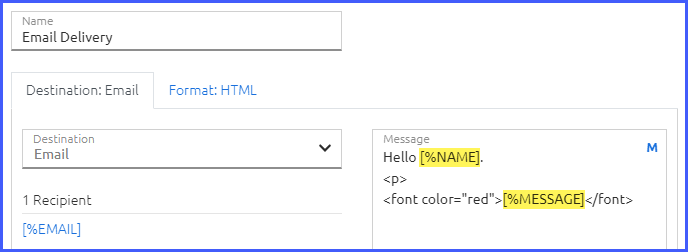
- Deliveries > Email Delivery > Message
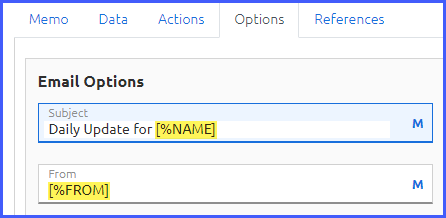
- Options > Subject
- Options > From
Select the M icon to launch the Macro Builder and customize a field with Extra Columns.
Message
The Message field in the Delivery supports simple HTML tags (email only) for text formatting, hyperlinks, and images.
CC/BCC
Configure CC or BCC address under Options.
Example
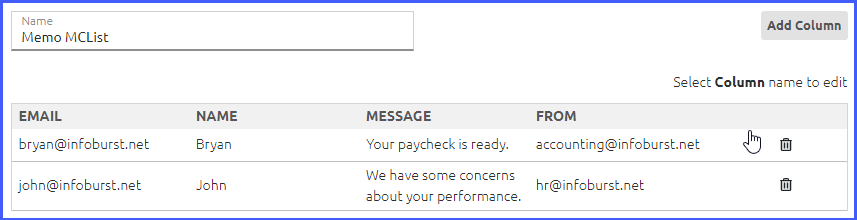
The following example uses a MultiColumn List.
MultiColumn List
Email Delivery
Options
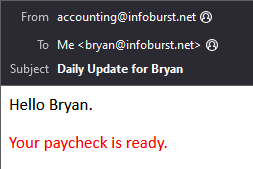
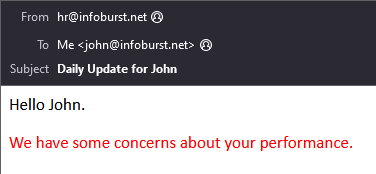
Resulting Email Messages