
Summary
This article describes the various methods available for processing a document or query in a Burst.
Multi-Pass Bursting
See Parameter Sources for details.
Single-Pass Bursting
See Filter Sources for details.
Power BI Reports
Filter Limitations
Due to limitations in the Power BI SDK used by InfoBurst, discovery of report variables is not supported. To use a Filter, identify and enter the names of the Table and Field, and select the data type of the Field:

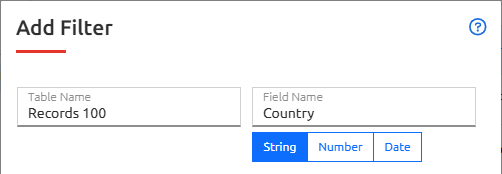
| Warning: Incorrect Table/Field names may result in unfiltered output |
If a Dataset generated by InfoBurst is used by the target Power BI Report, then a list of filter variables will be available for selection.
Date Filters
Power BI requires the ISO Date format YYYY-MM-DD.
Tableau
Tableau Workbook filtering with export to Excel Crosstab format supported in InfoBurst versions 2025.4 and later. Filtering to Excel Crosstab format not supported by Tableau in Tableau versions prior to 2025.1. Tableau version must be 2025.1 or later and TBAllowCrosstabFilter must be enabled under System > Configuration > Category:Tableau.
Crystal Reports
- Add a custom parameter field labeled #IB# with an identifier for the filter variable (example = #IB#City)

- Add a record selection equating the #IB# parameter to the filter variable (example = {eFashion_query.City} = {?#IB#City})

Combo-Pass
- Example: Multi-pass for parameter STATE then filter the result for CITY.